My Hurricane Tracker Pro
- 4.8
- Rating
- 10.00K
- Installs
- $3.99
- Price

 Analysis by App-foxy
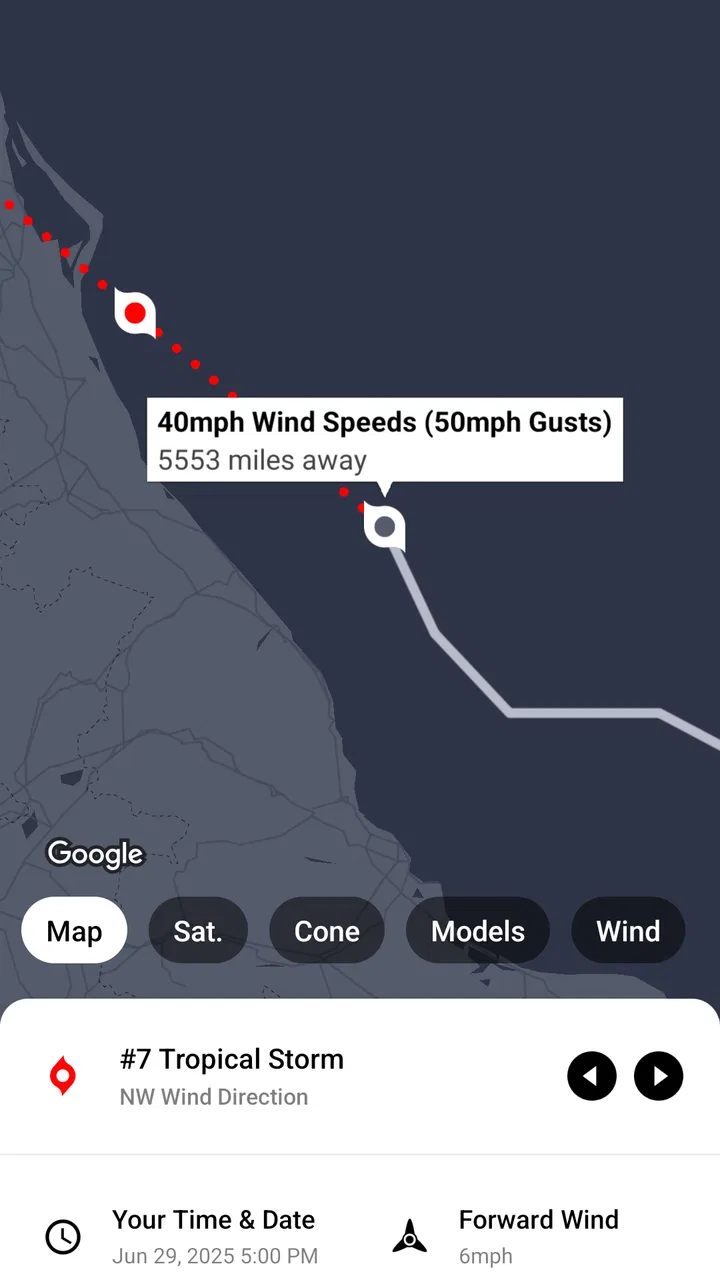
When I want more than a simple “rain later” answer, I turn to My Hurricane Tracker Pro. This weather app is built around serious storm watching, with forecasts and maps aimed at people following hurricanes, tornadoes, and cyclones rather than checking the temperature before leaving home. I found that focus useful because it changes how I read a forecast: instead of treating weather as a single icon, I can follow a developing system, compare its projected path with my plans, and keep important information in one place.
The app comes from JRustonApps B.V. and sits in the weather category. It is a paid app listed at $3.99, with optional in-app purchases priced at $0.99 per item. That combination makes the buying decision slightly different from a typical free weather application. You are paying for a more specialized experience, so the real question is not whether it can show a forecast, but whether storm tracking is important enough in your daily life to justify choosing a dedicated tool.
How the current app feels in everyday use
My first impression is that this is not trying to be a general-purpose replacement for every weather service. Its identity is much narrower and clearer. The emphasis is on monitoring dangerous or potentially dangerous weather, and that makes the interface feel more purposeful when a storm is developing. I do not open it expecting a huge lifestyle dashboard; I open it when I want context around a weather event.
You May Also Like

 Blood Strike: 2.5 Anniversary
Blood Strike’s Loadouts Turn Every Drop Into a Tactical Gamble
A close look at Blood Strike’s custom loadouts: how fast access to signature weapons reshapes its battle royale rhythm, rewards preparation, and narrows the gap between fights.

 Pandora - Music & Podcasts
Pandora’s Music Is Easy to Start, but Harder to Recover
Pandora’s strength is its low-effort path from a seed to a station. Its weak spot is how much confidence it asks you to place in connection, setup, and quiet recovery.

 8 Ball Pool
 Is Built on Rivalries, Rematches, and Routine
A close look at the rivalries, rematches, shared routines, and unanswered safety questions that turn a quick pool match into a persistent mobile community.

 Samsung Music
’s Quiet Strength Is Playing What You Already Own
Its reach comes less from spectacle than from dependable access to a personal library. That simplicity is both the app’s strongest retention engine and its ceiling.

 AccuWeather: Weather Radar
AccuWeather Review: A Quick, Clear Forecast for Everyday Decisions
For everyday plans, the best forecast is the one you can understand quickly. AccuWeather makes rain timing, radar, and local conditions easy to act on, with a few trade-offs.

 Hill Climb Racing
Why Hill Climb Racing Still Turns Crashes Into One More Run
A tiny car, a bumpy hill and one more upgrade: Hill Climb Racing keeps resurfacing because its simple chaos makes every near-miss feel personal.
More From Our News Desk



That distinction matters during hurricane season or when severe weather is moving across a region. A normal weather app may tell me that conditions will worsen, but a specialized tracker encourages a different workflow: identify the system, inspect the map, consider the projected movement, and then return later to see what changed. I find that approach more useful than repeatedly refreshing a basic hourly forecast without understanding the larger picture.
The store presents the app as suitable for Everyone, which fits its practical purpose. It is not written around technical meteorology, and I do not need to understand every forecasting term before I can use it. Still, the subject matter itself is serious. A clean interface should make information easier to understand, not encourage anyone to treat an app as a substitute for local emergency instructions.
Its current version is 26.4.1, and the app supports devices running Android 8.0 or newer. That gives it a reasonably broad place on older Android hardware, although the experience will still depend on how comfortably the device displays maps and layered weather information. On a small or aging phone, detailed storm graphics can be less convenient than they are on a larger screen.
A practical storm-watching routine
A realistic use case is a family preparing for a weekend near the coast. I would open the app several times rather than relying on one early forecast. First, I would look at the broader map to understand whether the system is moving toward the area. Then I would check the projected direction and compare it with the timing of travel, outdoor plans, or possible return routes. Later, I would revisit the same information and note whether the forecast has shifted.
The useful habit here is not simply “check the app.” It is checking for change. A storm path that looks comfortably distant in the morning may deserve a different level of attention later. I would also keep a second source available for local warnings, because a broad storm tracker and an official emergency channel serve different purposes. The app helps me build awareness; local authorities remain the right place for evacuation orders and urgent instructions.
Another good workflow is to use the map before reading the forecast details. Maps can reveal relationships that a text summary hides: the direction of travel, the distance between a storm and several locations, and whether a system is approaching from an unexpected angle. After that, I use the forecast information to add timing and likely conditions. This two-step approach is more informative than jumping straight to a single number or icon.
Where the maps earn their place
The maps are the heart of the experience for me. They turn a weather event into something I can inspect spatially rather than merely read about. That is especially valuable when I am watching a system from a distance, because the map gives a quick sense of scale and movement. It can also help when several people are discussing the same storm but are looking at different locations.
A less obvious benefit is that map-based tracking supports better communication. If I am explaining the situation to a relative, saying that the expected route is moving closer to a particular area is easier when I can point to the same visual context. I still avoid presenting a forecast path as a guarantee, but the map makes it simpler to discuss uncertainty honestly.
There is a trade-off, though. More visual information can also create false confidence. A neat projected line may look precise even when the actual future remains uncertain. I try to read the map as a planning aid, not a promise. The farther ahead I am looking, the more cautious I become about making firm decisions from one display.
What has changed for the product over time
The app was released on August 8, 2018, so it is not a new arrival trying to prove that storm tracking belongs on a phone. Its current version shows that the product has continued to receive development rather than remaining frozen in its original form. That history is relevant for existing users: a specialized weather app benefits from being maintained because forecasting interfaces, map expectations, and device compatibility all evolve.
I would describe the product’s development as refinement rather than a reason to expect a completely different app every time it updates. The core idea remains recognizable: use dedicated forecasts and maps to follow major weather systems. For someone who already understands that workflow, a newer version should feel like an ongoing tool rather than a reset of the experience.
That continuity is helpful when a storm is approaching. I do not want to relearn an entirely different structure at the moment I need information quickly. At the same time, long-term users should remember that an updated version does not automatically make every forecast more certain. Product evolution can improve access and presentation while the underlying challenge of predicting weather remains.
The app has an average rating of 4.8 from around 1.1K ratings, with 177 written reviews. I read that as a sign that its focused purpose resonates with the people who choose it, although a high average should not be confused with universal suitability. Someone looking only for pollen levels, lifestyle forecasts, or a broad daily weather dashboard may not value the same things as a hurricane watcher.
What existing users should expect
If you already use the app, the strongest reason to stay is its specialized workflow. You are not merely paying for another temperature display; you are keeping a tool designed around following severe weather systems. That can be valuable when you have built a personal routine around checking maps, reviewing movement, and returning to the same storm as new information becomes available.
Existing users should also be realistic about the limits of continuity. A familiar interface can make it easy to keep checking the same way even when the situation changes. I recommend deliberately comparing the latest view with the previous one and writing down any decision that matters, such as whether to travel or postpone an outdoor activity. That small habit prevents the app from becoming background noise.
The paid model may be comfortable for people who dislike advertising-heavy weather tools, but the optional purchases mean the total experience deserves a quick look before buying. I would not assume that every useful element is included simply because the app has an upfront price. Check what is available in the version you intend to use and decide whether the additional items fit your needs.
For a household, another practical question is who will actually use it. One person may enjoy following storm maps while everyone else wants a simple local forecast. In that case, this app can be a strong specialist tool on one phone, but it may not make sense as the only weather application for the whole family.
Where it falls short compared with ordinary weather apps
The obvious alternative is a mainstream weather app that combines current conditions, hourly forecasts, radar, widgets, and local alerts. Those apps are usually better for routine questions: whether I need a coat, when rain may begin, or how hot tomorrow will feel. They also tend to fit daily habits more naturally because they cover many types of weather in one glance.
My Hurricane Tracker Pro makes more sense when the event itself is the subject. Its narrower purpose can feel like a limitation on quiet days. If my main concern is commuting, gardening, or checking a week of ordinary temperatures, I would probably choose a general weather service instead and use this app only when a significant storm deserves closer attention.
It is also not the right choice as my sole emergency resource. I would still rely on official local alerts, emergency management guidance, and trusted broadcast information for immediate action. The app can help me understand the broader weather picture, but no phone application should replace instructions from authorities who know local roads, shelters, flood risks, and evacuation zones.
Another limitation is the mental effort required to interpret storm information responsibly. A map is more engaging than a plain forecast, but it asks me to pay attention to timing, direction, and uncertainty. Users who want one effortless answer may find that frustrating. The app rewards curiosity and repeated checking more than passive glance-and-go use.
Small habits that make the app more useful
I get more value from it when I decide in advance what question I am trying to answer. “Is the storm coming here?” is too vague. Better questions are: “Has the expected direction changed since this morning?” or “Does the projected timing affect my travel window?” Specific questions keep me from staring at maps without reaching a useful conclusion.
I also avoid checking only when the forecast looks alarming. A calm baseline makes later changes easier to notice. If I open the app before a system becomes a personal concern, I have a better sense of the map and can recognize when the situation deserves more attention. This is one of the app’s less obvious strengths: it supports monitoring, not just reaction.
For travel, I would use it alongside a route planner and local weather information rather than treating the storm map as a navigation tool. A projected path may cover a large region, while road closures and dangerous conditions can be highly local. The app helps me decide whether to investigate further; it cannot tell me that a particular road is safe.
For family discussions, I would share the timing and location in plain language instead of forwarding a screenshot without explanation. A screenshot can become outdated quickly, while a short note about when it was checked gives everyone better context. This is a simple but important trade-off: visual information is easy to share, yet it needs a timestamp and careful wording.
Who should install it, and who should skip it
I would recommend it to people who regularly follow tropical systems or severe weather, live in areas affected by hurricanes and cyclones, or have family and property concerns that make storm movement especially important. It can also suit weather enthusiasts who prefer studying maps and watching a system develop instead of relying on a single daily forecast.
I would be more hesitant to recommend it to someone who only wants a free, all-purpose weather screen. The $3.99 price is reasonable only if the specialized focus matches your needs, and the optional $0.99 purchases per item should be considered as part of that decision. If you rarely encounter major storms, a general weather app may give you more everyday value.
I would also skip it as a primary choice if your priority is hyperlocal routine information, such as neighborhood-level rain timing or a home-screen glance for the next few hours. A conventional weather app is often more convenient for those tasks. This one earns its place when the question is larger: what is the storm doing, where might it go, and how should I keep watching it?
What I would watch in future use
Because the current version is 26.4.1, I would pay attention to how future updates affect clarity rather than simply counting new additions. For this kind of app, the most meaningful improvements would be ones that make changing forecasts easier to compare, keep maps readable under pressure, and help users distinguish broad projections from information that requires local confirmation.
I would also watch how the paid structure develops. A specialist app can justify its price when its essential tracking experience remains straightforward. If optional purchases become confusing or make the basic workflow feel incomplete, that could change my recommendation. The best version of this product should let a storm watcher understand the situation quickly before inviting them to explore extras.
For current users, the practical test is simple: open it during a real weather event and see whether it helps you make a clearer plan than your usual app alone. If it does, the focused design is doing its job. If you still return immediately to a general forecast and official alerts for every meaningful decision, this may be better as a secondary tool than as your main weather application.
Overall, I see My Hurricane Tracker Pro as a focused companion rather than a universal weather replacement. Its maps and storm-centered approach give it a clear advantage when I need to follow hurricanes, tornadoes, or cyclones over time. The limitations are just as clear: it asks for more attention, it is less useful for ordinary daily weather, and it should never be the only source for emergency action.
My recommendation is therefore conditional but positive. If severe-weather tracking is a genuine part of your life, the dedicated design can be worth paying for, especially when it helps you notice movement and plan calmly. If you only need tomorrow’s temperature, choose the simpler alternative. The app is at its best when it turns storm watching into a deliberate routine, not when it tries to replace every weather tool on your phone.
FAQs for My Hurricane Tracker Pro
01What is My Hurricane Tracker Pro used for?
My Hurricane Tracker Pro is designed to help users monitor hurricanes, tropical storms, and other significant weather systems. It typically provides storm paths, projected movement, wind information, alerts, radar or satellite imagery, and forecast updates in one place. It is useful for general awareness and trip planning, but it should complement—not replace—official emergency instructions and local weather authorities.
02Does My Hurricane Tracker Pro provide real-time hurricane alerts?
The app is intended to keep you informed about developing tropical systems through notifications and updated storm information. Alert availability may depend on your device permissions, internet connection, location settings, and the app’s current data sources. Before relying on notifications, enable alerts in both the app and your phone’s settings, and regularly check official government weather services for urgent warnings.
03Can I use My Hurricane Tracker Pro to track a storm near my location?
Yes, the app can be useful for following storms that may affect a selected area or your current location. You can review forecast tracks, storm categories, wind fields, and other available details to understand how a system is developing. Forecast paths can change quickly, however, so users should avoid treating the projected line as a guarantee and should follow local evacuation guidance.
04Does My Hurricane Tracker Pro work without an internet connection?
Most hurricane-tracking features require an active internet connection because forecasts, storm positions, radar images, and official advisories must be downloaded and updated. Previously loaded information may remain visible temporarily, but it may become outdated and should not be considered reliable during an emergency. If traveling, download important emergency information in advance and keep alternative alert sources available.
05Is My Hurricane Tracker Pro free, and are there in-app purchases?
The availability of free features, advertising, premium tools, and subscription options can vary by platform and app version. My Hurricane Tracker Pro may offer additional capabilities through a paid upgrade, such as an ad-free experience, expanded tracking tools, or enhanced notifications. Check the Google Play Store or Apple App Store listing before downloading to confirm current pricing, billing terms, and cancellation conditions.
Pros
- Clear hurricane maps make storm paths easy to follow.
- Push alerts can provide timely updates for selected storms.
- Tracks multiple active storms across different ocean basins.
- Useful NOAA and National Weather Service information is included.
- Ad-free Pro experience keeps the interface less distracting.
Cons
- Some advanced features require a separate paid upgrade.
- Forecast paths can change quickly and should not replace official warnings.
- Frequent alerts may feel excessive during busy hurricane seasons.
- Coverage and updates depend on available internet access.
- The map can feel crowded when several storms are active.

My Hurricane Tracker Pro
Gallery